Showing posts with label Software. Show all posts

Tuesday, May 18, 2010

Fix matlab gui in linux

This term I had to do some work on matlab so I installed the linux version but I found something very irritating in the guide gui builder , the gui wasnt stable at all and every time I move a button or any control all the window flickers like this …

at first I thought compiz was the reason for this but it turns out that disabling compiz has no great effect.
after a lot of searching I found that the reason of the problem was Java !! … matlab didnt find the jre location therefore couldn't render the gui well,
so a the executing this simple command in your terminal solves the problem

export MATLAB_JAVA=/usr/lib/jvm/java-6-sun/jre/

note : you have to replace the path on the previous command with the correct path of the jre

Sunday, October 12, 2008

Project Touchless

Touchless is a free open source application hosted by CodePlex and built using .Net technologies , it enables you to do some touch tricks by using a webcam that tracks color based markers.

According to the project main page it is divided into two parts:

-Touchless Demo is an open source application that anyone with a webcam can use to experience multi-touch, no geekiness required. There are 4 fun demos: Snake - where you control a snake with a marker, Defender - up to 4 player version of a pong-like game, Map - where you can rotate, zoom, and move a map using 2 markers, and Draw - the marker is used to guess what....  draw!

-Touchless SDK is an open source SDK that enables developers to create multi-touch based applications using a webcam for input, geekiness recommended.

they provide a nice video which demonstrate all the features off the project.

Touchless

the first thing you might need after launching the demo is to set webcam and ensure that it is working then you will need to create markers, you should use a distinguished one so the camera can easily recognize and you can create more than marker , actually you will need more than one to play the demo's included.

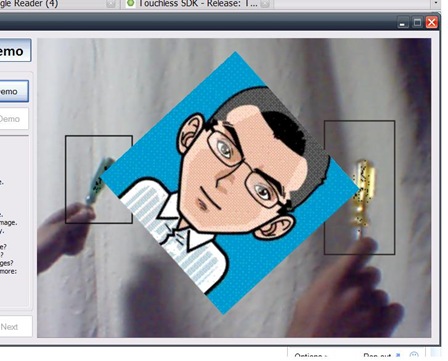
the demo that I liked most is called the image demo were you can rotate , move and resize a photo with two markers like pictures in iphone or Microsoft surface.

and here is a screenshot where I was able to control a picture with two screwdrivers :D.
123

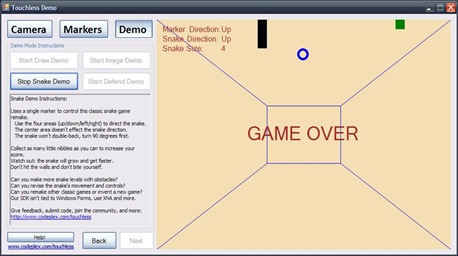
the second demo is a small snake game.
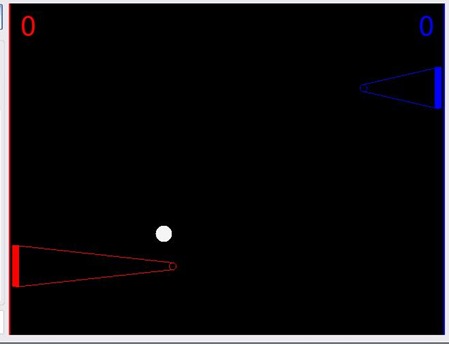
there is also another game that you can play with three other players
3

the last one is a paint demo where you can draw with markers.nice drawing,isn't it ? :).
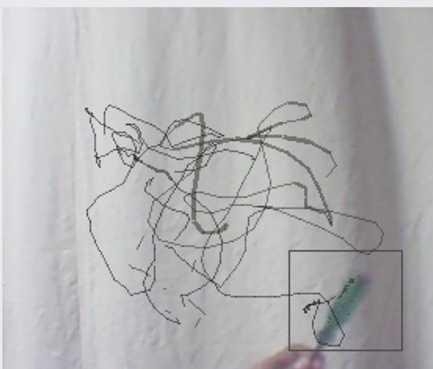
4

Finally I hope you enjoy Multi touch with Touchless :D.

Wednesday, October 8, 2008

Analogy Screensaver

Screensavers were made originally to protect old CRT monitors from a problem called Phosphor burn-in which occurs when static image or text is displayed for long periods of time however they were used later on for other purposes like entertainment and security.

Modern CRT's are less vulnerable to burn-in problems and LCD screens doesn't face this problems at all so screensavers have lost their main goal that they were designed for , another thing is that screensavers consume power as when running computer normally and it causes screen aging.

According to wikipedia :

A typical LCD screen loses about 50% of its brightness during a normal product lifetime, if left on continuously

So the best thing to protect your screen is simply to turn it off when not used or configuring your computer to set the screen into a lower power mode and that could be done from power management in most modern operating systems.

However , sometimes you need a good or useful screen savers to be displayed if you are going to be idle for few minutes...

and here comes Analogy (the reason this article was written) a useful screensaver that displays a nice hybrid format clock into your screen.

11

Analogy is available for windows and OSX and can be downloaded from here.

Friday, August 15, 2008

Protect your eyes with EyeDefender

if you sit in front of the computer for a long time you will find Eye Defender a great useful application. the main function of EyeDefender is to remind you to take breaks and relax your eyes after a fixed intervals of time which will help in reducing Computer Vision Syndrome (CVS)...that includes according to their site many bad symptoms:

CVS symptoms include eyestrain, blurred vision, delayed focusing, headaches, back and neck aches, dry and burning eyes, light sensitivity, distorted color vision, forehead heaviness, and sore eyes.

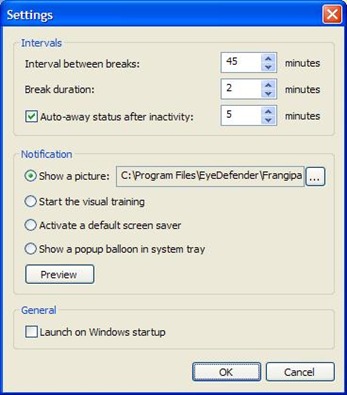
After Downloading and installing the program you will notice that its main interface is simple and self explanatory. 3

the program gives you for four options for Break notification :

  • A beautiful picture that you might change if you Desire.
  • A visual trainer that is supposed to relax your eyes.
  • Lunching the default screen saver.
  • Showing a popup balloon.

2 1

Whatever option you choose EyeDefender is a useful (free for non-commercial use) application that deserves a try.

Wednesday, August 13, 2008

Have you tried Phun ?!!

Phun is a -free for non-commercial use- 2d physics sandbox , it proves that Physics Could be Fun :) with lots of tools that you can use to create great simulations or machines.

According to their main site:

Phun is a free game like 2D physics sandbox where you can play with physics like never before. Children, students, engineers, artists, university professors, and many others, use Phun for telling stories, learning, constructing amazing machines, creating games - or just for the plain fun of it.

A fully controlled telescope crane Monster truck

for more screenshots and Videos visit phun media page http://www.phunland.com/wiki/Media.

Phun is available for Windows (xp/vista),Linux and mac OSx and It can be downloaded from the main site www.phunland.com also the site provides a great and comprehensive tutorials found here.

hope you enjoy Physics now :)

Tuesday, August 12, 2008

Muslim Prayer Time Reminder

Do you sit a lot in front of your Computer and forget about prayers ???
here is one solution for this problem : a program that sets in your desktop and reminds u before each Prayer.

For Windows users :
Ela Salaty (towards my prayer) is a great prayer time reminder as it offers many features but unfortunately it comes with arabic interface only.

installation :
-Download a free copy from "http://www.ela-salaty.com/"
-installation is easy just lunch the installer and follow the instructions


Pros:

-Great and easy user interface. -Different ways to alert you to prayer time.
-Play athan with more than one voice.

-The possibility of printing times of prayer for the full month or Hijri calendar. -The ability to listen to radio stations via the Internet. -There are more features that you can find at the site or discover your self :)

Cons:

the main drawback as stated before is the lack of english user interface so if u dont speak arabic there is another free program called athan basic that supports English and you can find it here http://www.islamicfinder.org/athanDownload.php
or http://www.download.com/Athan-Azan-Basic/3000-2135_4-10206122.html


it offers the same features as “ela salaty” Plus the English user interface.


For Ubuntu Linux Users :
there is a small simple application that u can download from the official Ubuntu repositories.
Installation:
-click Application >> Add/Remove
-choose all open source application from the list in the top
-search for Minbar and install it

now u can open it from application >> accessories >> Minbar


Pros:
-Very simple application.
-Relatively low memory usage approximately 10.5 MB.
-Determine Qibla Direction.
-play athan.

Cons:
-it lacks a lot of features found in “ela salaty” and athan basic.
-it doest come with athan sound file so you will have to search for one.

5 years of kotbcorp

Two days ago this blog completed its 5th year  :). So congratulations to my self and Thanks for the few followers that have been here for ...