Wednesday, August 14, 2013

5 years of kotbcorp

Two days ago this blog completed its 5th year  :).
So congratulations to my self and Thanks for the few followers that have been here for the past 5 years.


You can view site statistics here.

A lot happened in the last 5 years, good and bad stuff, hope the next 5 years are going to be better for me and for the readers.

Thanks
Ahmed Kotb

Sunday, August 5, 2012

Signal Flow Graph Solver (sfg.js)

Hi it's been a while since i have posted here (about 1 year) and i apologize for that,a lot happened in the last year that prevented me from keeping this blog updated.
Any way this post is about a project that i have been working on in my free time.
It's a signal flow graph solver made entirely in javascript. it might come handy in solving simple problems or for demonstration of signal flow graphs.
Here is a quick -not so fancy- video about the application

I have released the source code on github under the mit license,so check it if you are interested.
hope you might it useful.

Friday, May 27, 2011

Mimic Compiz Zoom in Windows 7

The most thing that i miss once i log into windows is the compiz zoom using the winkey and the mouse wheel feature on linux , i tried to search for alternative but with no luck each time till i read an article recently on lifehacker which shows that the new built in magnifier in windows 7 has a mode to magnify the whole screen rather than certain part (aka docked mode) , that was great news except the shortcut keys are Winkey +/- and can't be changed !!.

After some searching i found a program called autohotkey that could serve me in solving this issue , any way if you aren't into technical details you can grab the compiled version and start using it immediately.
Otherwise , here is the complete source code of the script
; Created By :
;     Ahmed Kotb on 27/5/2011
; licensed under :
;     Creative commons Attribution 3.0
;     http://creativecommons.org/licenses/by/3.0/us/
; version :
;     1.0

; A small script that enables you to zoom in/out using the winkey
; and mouse wheel instead of winkey +/- on windows7 magnifier program

#NoEnv
SendMode Input
SetWorkingDir %A_ScriptDir%

;zoom in
#WheelUp::send #{sc4E}
;zoom out
#WheelDown::send #{sc4A}

You may need to alter the default zoom value instead of 100%  to a more usable amount , iam fine with 25%

Hope you find it useful.

Thursday, October 21, 2010

Android Art

One of my friends (Mohamed El Geweily) sent me this image yesterday , hope you like it

this is a 1440 x 900 version


and this is 720 x 450 version


you can tell your opinion here in comments or contact Mohamed directly on his mail

Wednesday, July 21, 2010

Missing Icons in Gnome System Menu

since i have installed ubuntu 10.04 ,  i have noticed that the icons in the system menu is missing ,  like this


actually i didn't bother .. but today i had some time to kill so i searched about that issue and found that it is a known bug since karmic and the solution is not that hard

here are the steps :

  1. Press Alt+F2 ... type gconf-editor and press run
  2. navigate to : /apps/desktop/gnome/interface
  3. and make sure that the menus_have_icons is marked
here is the gconf-editor screen


and you will have your icons back :)

i also noticed that this option brings icon to many menus in Ubuntu not just the system menu
here is the bug page: https://bugs.launchpad.net/ubuntu/+source/gnome-panel/+bug/442973
hope that was useful

Wednesday, June 23, 2010

missing unix2dos and dos2unix in ubuntu 10.04

unix2dos and dos2unix were handy tools used to convert files' endings from/to windows and Linux.
after i installed ubuntu 10.04 then installed the tofrodos package as usual i was surprised that the two programs doesn't exist , after some searching i discovered that the programs were just given different names
so:
the unix2dos become todos
and the dos2unix become fromdos
you can adopt to this new names or give them aliases if you wish...
hope that was useful.

Saturday, June 19, 2010

git packing

while i was reading the git community book , i have noticed this paragraph in the first chapter

It is important to note that this is very different from most SCM systems that you may be familiar with. Subversion, CVS,Perforce, Mercurial and the like all use Delta Storage systems - they store the differences between one commit and the next. Git does not do this - it stores a snapshot of what all the files in your project look like in this tree structure each time you commit. This is a very important concept to understand when using Git.
actually i didn't believe that ... i thought that would make git the most space inefficient scm ever created ... although data is compressed before storing but still each new change to a file however small will make git store ALL that file Again to the repository !!!!

so to make sure of that i wrote the following script

#!/bin/bash
git init
i=0
while [ $i -lt 20 ]
do
 echo commit $i
 du -hs
 git add a > /dev/null
 git commit -m "commit $i" > /dev/null
 i=$(($i+1))
 echo $i >> a
 echo '--------------'
done

the script appends one character to the file then commits the changes , at each commit it prints the size of the repository.
during the 20 commits the size of the repository grew from 1020K to 7.1 MB !!!

off course that is not the full story , git uses something called Packing ... it stores large number of objects in the same file using delta-compression , so data is not written more than one time , still newly created objects are stored again so periodic repacking is needed to reduce the repo size.

lets try to execute git gc in our repo
it prints the following
Counting objects: 60, done.
Delta compression using up to 2 threads.
Compressing objects: 100% (40/40), done.
Writing objects: 100% (60/60), done.
Total 60 (delta 20), reused 0 (delta 0)

and the size of the repo became 1.3 MB !!! that is just great ...
so git is really space efficient compared to others.

Tuesday, May 18, 2010

Fix matlab gui in linux

This term I had to do some work on matlab so I installed the linux version but I found something very irritating in the guide gui builder , the gui wasnt stable at all and every time I move a button or any control all the window flickers like this …

at first I thought compiz was the reason for this but it turns out that disabling compiz has no great effect.
after a lot of searching I found that the reason of the problem was Java !! … matlab didnt find the jre location therefore couldn't render the gui well,
so a the executing this simple command in your terminal solves the problem

export MATLAB_JAVA=/usr/lib/jvm/java-6-sun/jre/

note : you have to replace the path on the previous command with the correct path of the jre

Friday, April 30, 2010

Ubuntu 10.04 Released

Ubuntu 10.04 LTS


it has been long since my last post but today Ubuntu 10.04 was officially released and available for download with lots and lots of new features ...the sad news is iam still using 9.04 and i dont have any time for a clean install due to study and assignments :(

which reminds me about a program that i use to manage my todo lists and i wanted to blog about but unfortunately there was no time for it either ...
Getting Things Gnome is a small program to manage todo lists and tasks

pretty list , isn't it ? :)

just found that it will be getting an integration with online services like remember the milk which is great..
any way enjoy Ubuntu :)

Sunday, February 21, 2010

Wednesday, December 9, 2009

My First Google Chrome Extension

yesterday i have uploaded my first Google chrome extension to the official extension gallery that was opened for public few days ago.
say hello to Chrome MineSweeper :D


i know that some will say that mine sweeper is not some thing that you will use every day.. and i agree to some extent with but if you really understood this game you will find it really addicting .. i remember the first time i played it i finished the advanced board in 9 min !!!! but after some time my speed increased dramatically and i finished with this scores.

  • Small Board : 6 seconds
  • Medium Board : 41 seconds
  • Large Board :  135 seconds

which aren't a world class records :) but still makes me proud :D


any way ,
hope you like the extension ...
and please don't hesitate to leave your feedbacks and/or comments here.

back to blogging

i really have to apologize for that long time without even a single post but i was really busy in my study and exams.
i have a few posts coming soon about google wave and my first google chrome extension :D before returning to the final exams :(

Friday, August 21, 2009

Happy Ramadaaan

to the few who follow this blog and to all the world....Happy Ramadaaaan

Thursday, June 25, 2009

Quine-mcCluskey Logic Simplifier

in our fundamentals of logic design course we were required to implement the Quine-mcCluskey tabular method as (a summer project) to simplify boolean function and i was able to implement it using python  so i decided to share it hope it could be useful to some one ...

here is an executabe version for windows..(made using py2exe project)


and here is the python source code files...


it is worth mentioning that the source files consists of :
tabular.py : which the main program is found and u could also execute it from the command line using arguments
gui.py : which is a graphical user interface for the program using tkinter libs
   
features:
  • able to solve Boolean function upto 26 variable (theoretically it can do more but this just a limit that i enforced to be able to represent the variables using A,B,C....Z Notations , of course u can  remove this limit)
  • displaying the prime and essential implicants ( by default the program displays the implicants on letters but u can also change this to display them in numbers )
  • perform petric brute force algorithm to get the best (lowest cost) solution
  • draw the Prime Implicant chart before finding the essential prime implicants and after finding them...
to do :
those are some ideas that may/may not be done...
  • adding column and row dominance simplifying techniques.
  • adding a documentation for tabular.py and more comments to illustrate the algorithms used.
  • adding an interactive mode to solve the problems step by step.
  • adding a karno-map simulation.
  • improving the gui....
  • adding the project to source-forge ?...may be... :)
ScreenShots:
using gui mode


using the command line ( this picture is a part of the output not all of it)


finally... i will really appreciate any feedbacks , bug reports and/or opinions.
please send them to

or here in the comments...
thanks...
           

Sunday, June 14, 2009

Shutdown after Update in ubuntu

last two weeks i was busy in my exams and ubuntu wanted to download alot of updates..that is normal but for people with low connection speed having alot of updates is not that nice...as i will have to leave the computer open for a long time and offcourse i will not be able to use the Internet as the update-manager draws all the speed..so i decided to leave it open and go some where but i found no option in ubuntu update manager to close the computer after finishing updates so i created this small python script that will shutdown the computer after finishing all the updates and here it is...


import time
import os
import getpass
password = getpass.getpass('please enter your password : ')
x = os.popen('ps -ef | grep "/usr/bin/gksu --desktop /usr/share/applications/update-manager.desktop"')
s=x.readline()
x.close()
if s.find("grep") == -1 :
 running=True
 print "updating manager is working..."

 while(running):
   x = os.popen('ps -ef | grep "/usr/bin/gksu --desktop /usr/share/applications/update-manager.desktop"')
   s=x.readline()
   x.close()
   time.sleep(10)
   print "still working..."
   if s.find("grep") != -1 :
    running=False
  
  os.popen("sudo -S shutdown -h 5", 'w').write(password)


Script usage is very simple :
just lunch the update manager and start the update process as usual then open a terminal and lunch the script (python "scriptname.py")
you will have then to write your password it is only used to call the shutdown command (i promise :D ) then you can go to sleep :D and the script will do the rest...
after finishing updates the script will give you 5 min to cancel the shutdown proccess if you have changed your mind...
hope you found this script useful

Saturday, May 9, 2009

Google Chrome Ad


While I was browsing my Google reader today I found this interesting news…

Google will start promoting their browser "chrome" through a TV ad !!!
Although I still consider Firefox my main browser for many reasons I really liked the ad idea so have a look and tell me your opinions...

Friday, March 13, 2009

get your hotmail emails in gmail

Hotmail finally after a very long time have enabled pop3 for free so you can get your emails in any mail client that support pop3 protocol..
However , i wanted to forward my emails to my Gmail account so here is how u can do it ( don't worry you don't have to know what is pop3 to follow this tutorial :D )
  • open settings >> account tab
  • select "add email account you own"
  • enter ur hotmail accout email address and click next step
  • fill the data in the form that will appear as following
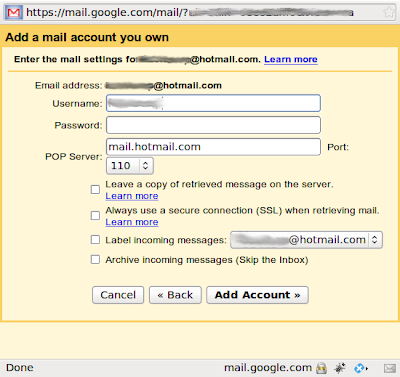
user name : yor complete email address
password : your password
pop server : pop3.live.com
port : 995

you have the option to leave a copy in hotmail account or delete it.....it is better to use ssl when retrieving mail as it is more secure...
gmail also enables you to create a label for the incoming mail and you can also achieve it..
click on add account and you are done :) .
gmail will also give u the option to send mail from your account , you can follow the instructions to do such thing...

after that you might found a new 300 emails in ur inbox ...dont panic !!! gmail have just download your whole hotmail inbox..you can then delete or achieve this messages.

it is worth mentioning that the main drawback for using this way that u might not recieve your emails at the same instant they were sent to your hotmail inbox as Gmail checks new messages at different rates, depending on previous mail fetch attempts and you cant control this rates...

Wednesday, March 4, 2009

Nexus FaceBook Friend Grapher

Have you ever wondered how your facebook friends are related to each other ???
while i was browsing the web i found nexus , an amazing application that answers this question by Generating a graph of your facebook friends so you can visualise how they are connected together and also get alot of information that could take you alot of time if you tried to get it manually....
any way..here are few screenshots of nexus home page and my friends graph

the Home page

The friend graph in the light themethe friend graph in the Dark theme

note that each node in this graph represents a friend so you click any node to get alot of information about that friend.

Saturday, November 29, 2008

HP Magic Giveaway

image hp in its celebration of this holiday session and the thanksgiving will give 50 bloggers a six thousands dollars valued package to share with their visitors. !!!

so what does this package include ?

According to hp magic giveaway site , windows connected , Jake Ludington’s and GearLive Blogs

Hardware

Accessories

Software

Entertainment

hp

an interesting package isn't it ?? :)

for the complete list of blogs see this link.

it is worth mentioning that each blog will define its rules to win the package ...some will choose randomly others will require you to register in their site ..etc. but the what I have noticed is that the common rule in many blogs is that you will have share your prize with others..windows connected blog says "impacting a number of peoples lives with the hardware will get you the best chance to win" also bleeping computer blog require that you share at least one computer with some one who is in need of it...

Another thing to know is that not all of the blogs will start in the same time..each blog will start on a certain date and choose a winner after a week..I found an excellent article in istartedsomething blog which lists all the blogs and their starting dates in a fancy Google calendar :)...

and yes this giveaway is global and not restricted to USA citizens..so go ahead and don't forget your friend :)

Good Luck For Every One...

5 years of kotbcorp

Two days ago this blog completed its 5th year  :). So congratulations to my self and Thanks for the few followers that have been here for ...